DNS Lookup for Mac
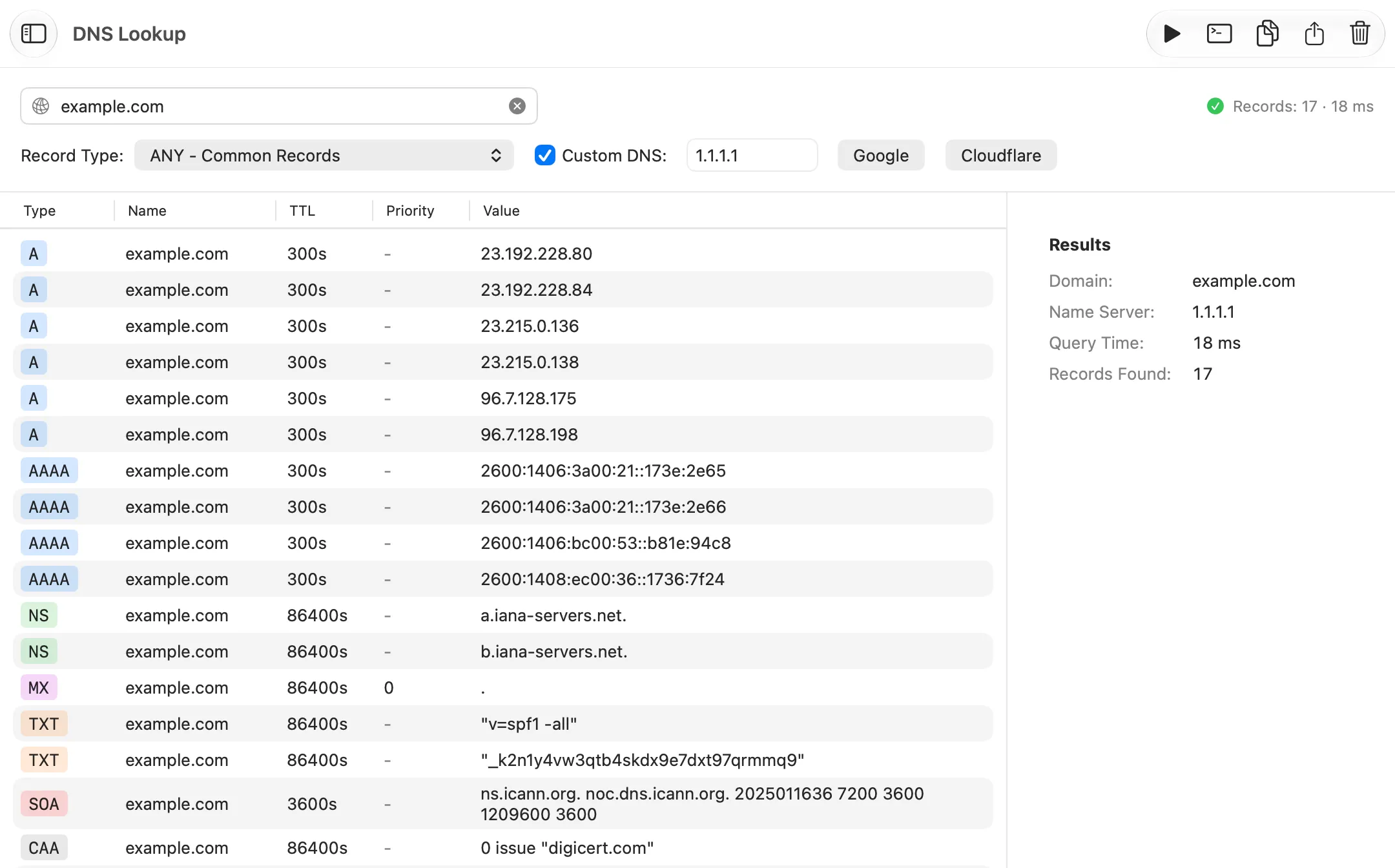
DNS Lookup asks DNS what a domain points to. Netutilus does what dig and nslookup do, in a window: every record type, from your Mac's resolver, an encrypted public resolver or any server you type in. Free.
Download on the Mac App Store ↗
free to download · macOS 14.6 or later
$ dig example.com MX
$ nslookup example.com
What it’s for
DNS turns names like example.com into the addresses computers connect to, and holds other records too: where a domain’s mail goes, who may issue its certificates, which servers are in charge of it. DNS Lookup asks for any of them, like dig in Terminal.
Use it when
- A website or email doesn’t work, and you want to know whether its name resolves.
- You changed a DNS record and want to check what it says now.
- You want to compare what your router’s DNS answers with a public resolver.
Reading the result
Enter a domain, pick a Record Type and click Lookup. Each answer shows its type, value and TTL: the number of seconds a resolver may keep the answer before it must ask again. Common Records asks for the usual types at once.
- A and AAAA are the IPv4 and IPv6 addresses.
- CNAME says the name is another name’s alias.
- MX names the mail servers, lowest priority number first.
- TXT holds text, such as the SPF and verification records email and services use.
- NS and SOA name the servers responsible for the domain.
What you might see
- Domain does not exist (NXDOMAIN). The name isn’t registered, or there’s a typo.
- The domain exists but has no records of this type. Try another type, or Common Records.
- SERVFAIL or REFUSED. The server couldn’t or wouldn’t answer. Try a different server.
- The query timed out, against a server on your network: Netutilus may need Local Network access. A hint appears when it looks that way.
Options worth knowing
- Custom DNS asks a server of your choice. Google, Cloudflare, Quad9, OpenDNS and AdGuard are asked over encrypted DNS (DNS over HTTPS). Any other address, such as your router or a Pi-hole, is asked directly.
- Right-click a record to copy it.
Related
- DNS, how names are resolved.
- DNS Propagation, to compare many resolvers at once.
- A website won’t open.
Try DNS Lookup on your Mac
Netutilus puts every network tool in one app. Free to download; Pro is a one-time purchase, never a subscription.
More in DNS & Domains
- DNS PropagationAsks several public DNS resolvers at once whether they see a record change yet.
- GeoIPShows roughly where an IP address is, and which provider it belongs to.
- SSL CertificateShows the certificates a server presents, when they expire, and why a connection isn't trusted.
- WhoisShows who registered a domain or an IP address, when, and who to contact about it.