Internet Check for Mac
When the internet is bad, the first question is whose problem it is. Internet Check is a free tool in Netutilus for Mac that tests each stop between your Mac and the web and names the one that most likely causes the trouble. It also saves a report card you can send to your provider.
Download on the Mac App Store ↗
free to download · macOS 14.6 or later
$ ping -c 10 192.168.1.1
$ ping -c 10 1.1.1.1
$ dig apple.com
$ curl -I https://www.apple.com
What it’s for
Internet Check answers the first question anyone asks when the connection is bad: is it my Wi-Fi, my router, or my provider? It tests each stop between your Mac and the web in turn, and points at the one most likely to blame.
Use it when
- Pages load slowly or not at all, and you don’t know where to start.
- You’re about to call your provider and want to know whether it’s really them.
- You’ve joined a hotel or café network and nothing works.
Reading the result
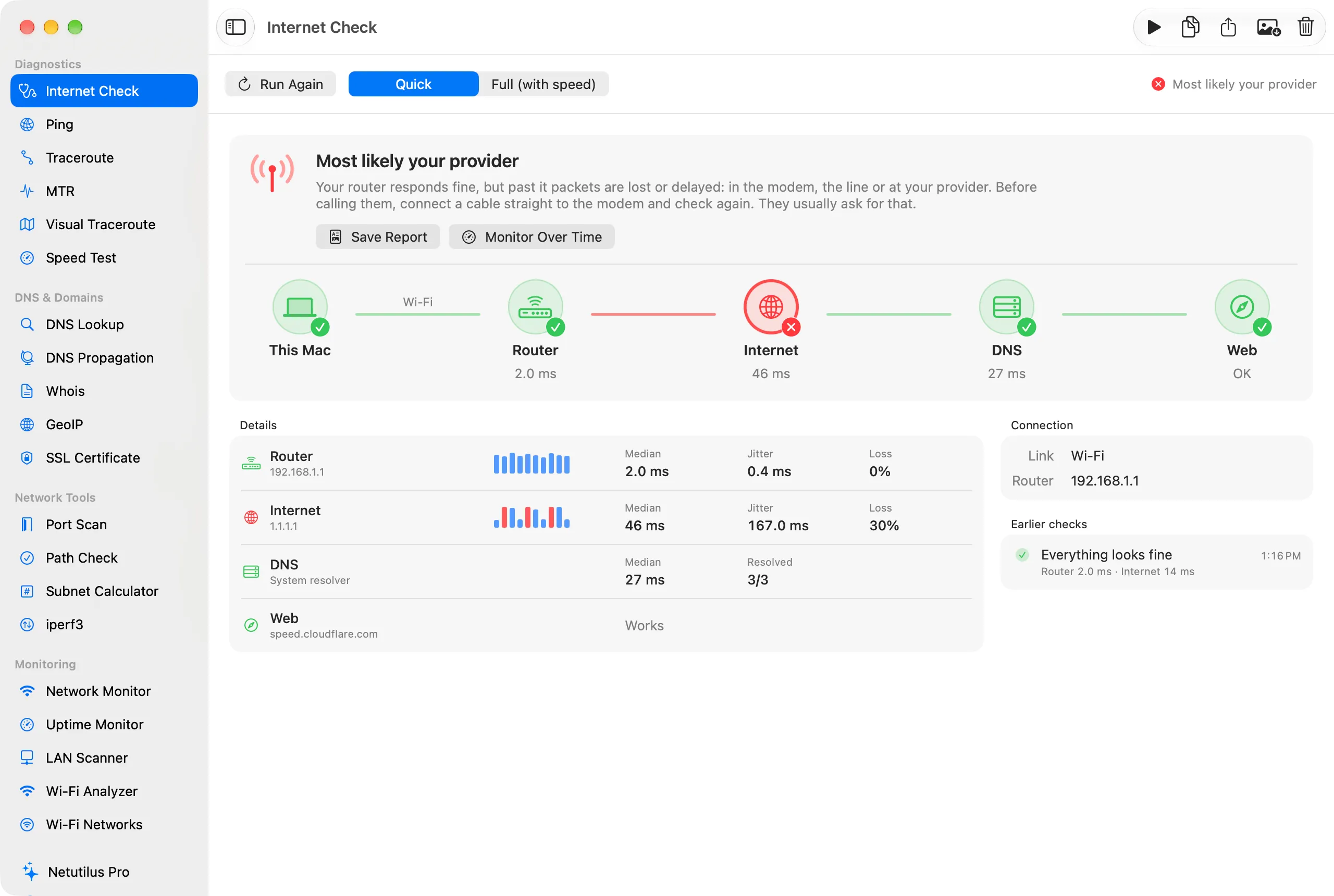
Click Check My Connection. The result is drawn as the path your traffic takes: This Mac, Router, Internet, DNS and Web.
Above the path, the verdict says the same in words. Details lists each stop’s typical time (the median of its probes, so one slow probe doesn’t change it), its jitter and its loss, with a strip of every probe.
What you might see
- Most likely your provider. The router is fine, the internet past it isn’t. Save Report keeps the result as an image you can send them.
- The problem is on your side. The router itself is slow or loses probes: usually the Wi-Fi. See Wi-Fi Analyzer.
- DNS is slow. The connection works, but looking up names takes too long. See DNS.
- A login page or filter is in the way. A hotel or café network wants you to sign in. Open Login Page brings it up.
- Can’t tell. For example, a VPN is on, or the router doesn’t answer probes. The check says why instead of guessing.
Options worth knowing
- Quick takes about 15 seconds and almost no data. Full adds a speed test: about a minute and up to 1 GB, usually much less.
- Earlier checks keeps your previous results, so you can compare a bad moment with a good one.
- With a VPN on, everything is measured through the tunnel, and the result says so.
Related
- The internet is slow or keeps dropping, the full routine.
- MTR, for problems that come and go.
Try Internet Check on your Mac
Netutilus puts every network tool in one app. Free to download; Pro is a one-time purchase, never a subscription.
More in Diagnostics
- MTRA traceroute that keeps running, so you can see where on the path packets are lost, and when.
- PingSends probes to a host one after another and shows how long each answer took, and which never came.
- Speed TestMeasures your download and upload speed, and how much the delay rises while the line is busy.
- TracerouteLists every router between your Mac and a host, and how long each one takes to answer.
- Visual TracerouteDraws the route to a host on a map, hop by hop.