Visual Traceroute for Macpro
Visual Traceroute runs a traceroute and draws it on a map: each router placed in its city, the path between them, and how long each one took to answer. It is the easiest way to see which countries your traffic crosses. Part of Netutilus Pro.
Download on the Mac App Store ↗
free to download · macOS 14.6 or later
$ traceroute example.com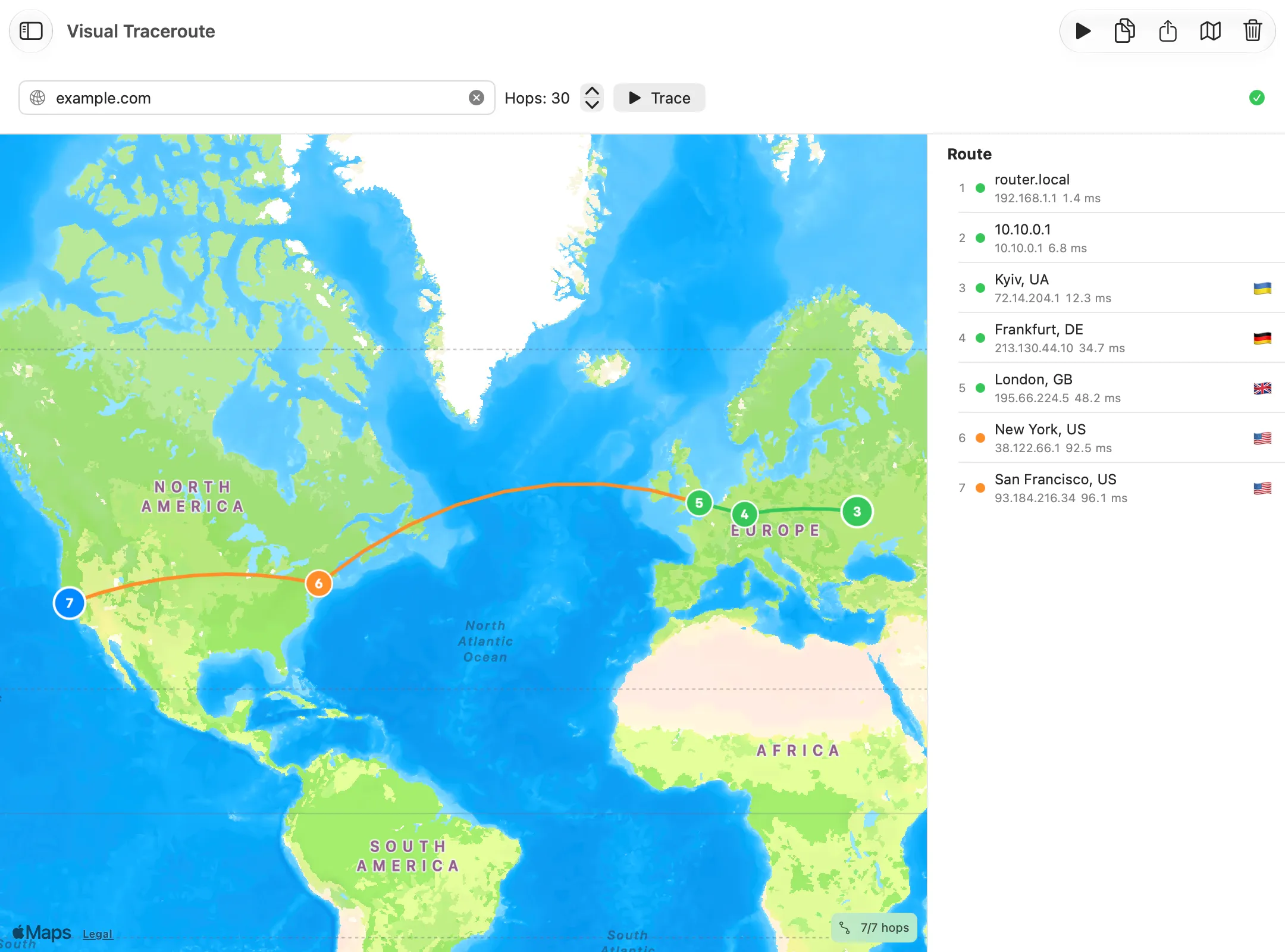
What it’s for
Visual Traceroute runs a traceroute and puts every hop it can place on a map, so you can see the route your traffic takes across cities and countries, and where the long stretches are.
Use it when
- A server is slow and you suspect your traffic takes a detour.
- You want to see which countries your connection passes through.
- You need a picture of the route for a report.
Reading the result
Enter a host and click Trace. The Route list shows each hop with its address, location and reply time, and the map draws the path between the hops it could place, coloured by reply time. Select a hop to find it on the map.
Locations come from the hop’s IP address, which says where the address is registered, not exactly where the router stands. Treat them as approximate. When a location can’t be true for the reply time (a router “in Sydney” that answers a Mac in London in 5 ms), the hop is marked Location unlikely for this RTT.
What you might see
- Hops without a pin. Private addresses, like your router’s, and silent hops have no location.
- A sudden jump in reply time where the line crosses an ocean. That is distance, not a fault.
- A route that goes far away and comes back. Traffic is often routed through a big exchange point first, even to a server nearby.
Options worth knowing
- When the trace finishes, the map zooms to fit the whole route.
- Right-click a hop to copy its details, or open it in Ping, Whois or GeoIP.
- Export the hops as text or CSV, or Export Map Image… for a picture of the map.
Each public hop is looked up with a location service, and the map comes from Apple Maps. See Permissions & Privacy.
Related
- Traceroute, the same route as a table.
- GeoIP, for one address in detail.
- Hops and TTL.
Try Visual Traceroute on your Mac
Netutilus puts every network tool in one app. Free to download; Pro is a one-time purchase, never a subscription.
More in Diagnostics
- Internet CheckOne button that tells you whether a problem is on your side or at your provider.
- MTRA traceroute that keeps running, so you can see where on the path packets are lost, and when.
- PingSends probes to a host one after another and shows how long each answer took, and which never came.
- Speed TestMeasures your download and upload speed, and how much the delay rises while the line is busy.
- TracerouteLists every router between your Mac and a host, and how long each one takes to answer.