Wi-Fi Networks for Macpro
Wi-Fi Networks scans the networks around you, draws them across the channels they take up and tells you which channel your router should move to. Part of Netutilus Pro.
Download on the Mac App Store ↗
free to download · macOS 14.6 or later
$ system_profiler SPAirPortDataType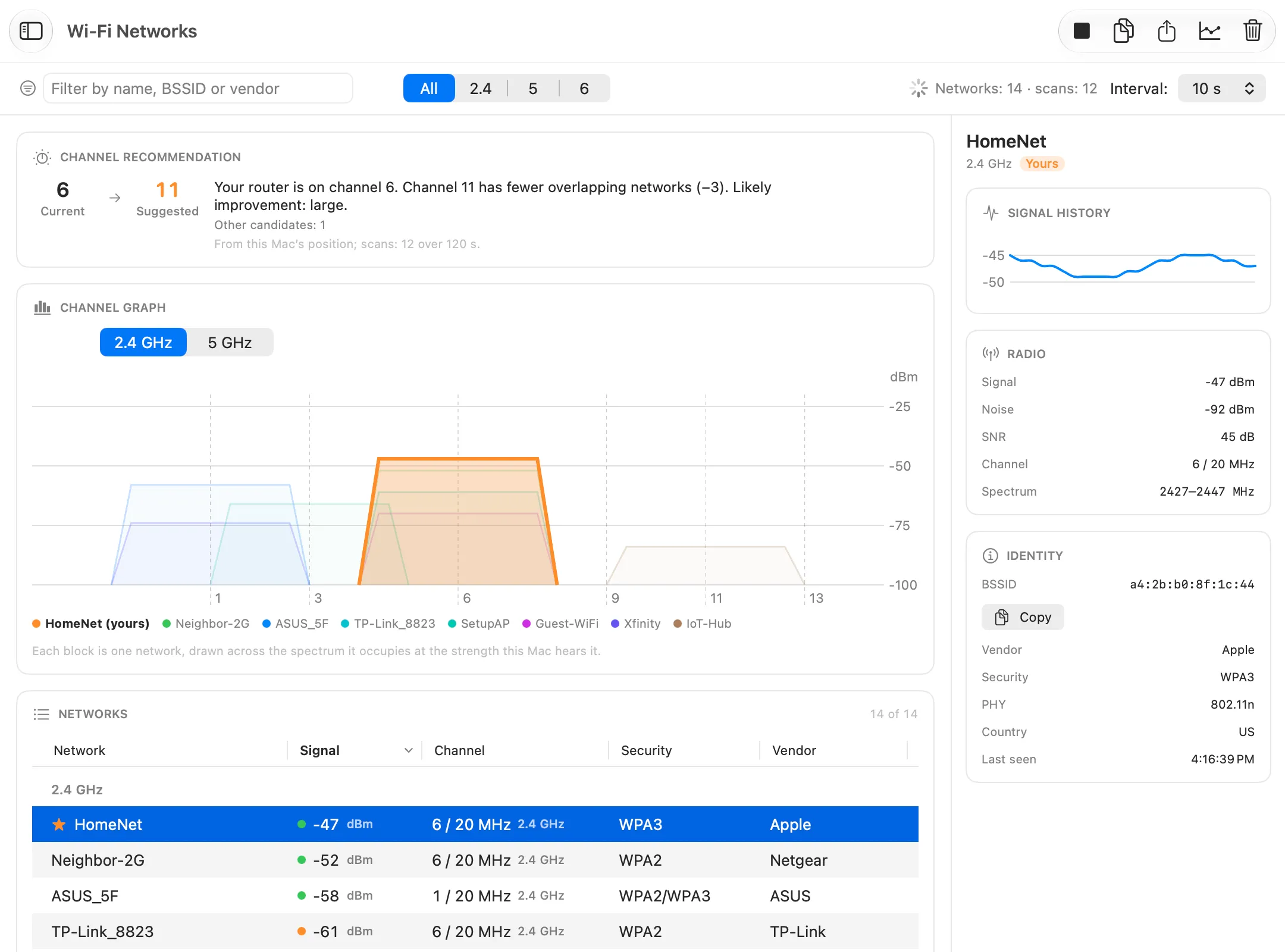
What it’s for
Your Wi-Fi shares the air with your neighbours’. Wi-Fi Networks scans the networks your Mac can hear, draws the part of the spectrum each one uses, and recommends the channel where yours would meet the least competition.
Use it when
- Wi-Fi gets slow in the evening, when everyone around is online.
- You’re setting up a router and choosing its channel.
- You want to know what’s around you: names, makers, Wi-Fi standards and security.
Reading the result
Each shape is one network: as wide as the spectrum it uses, as tall as its signal at your Mac. On 2.4 GHz, only channels 1, 6 and 11 don’t overlap.
The Channel recommendation above the graph names the best channel, says how much it would help and what it is based on. Below the graph, the table lists every network. Select one for its details and signal history.
What you might see
- No network names. macOS shows them only to apps with Location access. Netutilus asks for it when you first scan, and never reads your location.
- Your router’s other networks, such as a guest network or a mesh node, don’t count against you. They move with your router.
- “Paused while another tool measures the connection”. A scan briefly takes the radio off your channel, so it waits until the measurement ends.
Options worth knowing
- It scans only while you let it. Interval sets how often, at most every 5 seconds.
- The recommendation needs at least three scans.
- Where your devices support it, use 5 GHz. It has more channels and fewer neighbours.
Related
- Wi-Fi bands and channels.
- Wi-Fi Analyzer, for the signal of your own connection.
- Wi-Fi is weak in some rooms.
Try Wi-Fi Networks on your Mac
Netutilus puts every network tool in one app. Free to download; Pro is a one-time purchase, never a subscription.
More in Monitoring
- LAN ScannerFinds the devices on your network, works out what they are, and can tell you when a new one joins.
- Network MonitorWatches your Mac's network connection live, and logs every change.
- Uptime MonitorChecks your servers, websites and devices on a schedule, alerts you when one goes down, and keeps the history.
- Wi-Fi AnalyzerShows your Wi-Fi signal live, and tells whether a problem is the Wi-Fi or the internet behind it.