Advanced IP Scanner is a free Windows network scanner from Famatech. Its site says “Compatible with Windows 11, 10, 8, 7”, and its download page serves one Windows file, Advanced_IP_Scanner_2.5.4594.1.exe. Famatech offers no Mac build, so a “Mac version” on a download portal does not come from Famatech.
On a Mac you have three free routes (Angry IP Scanner, nmap and arp in Terminal) and a few Mac apps. Each is below, with what it shows and where it falls short.
Commands tested on macOS 27.0.1 on 2026-10-20.
What people used Advanced IP Scanner for
Famatech lists these features. The right-hand column is the closest thing on a Mac.
| Task | Advanced IP Scanner (Windows) | On a Mac |
|---|---|---|
| List the devices on the network | “The program shows all network devices” | Angry IP Scanner, nmap -sn, LanScan, Fing, Netutilus LAN Scanner |
| Show MAC addresses | “MAC addresses detection” | Terminal arp -a; in apps it depends, see below |
| Open shared folders | “Easy access to network shares” | Finder › Go › Connect to Server |
| Remote control | “Remote control via RDP and Radmin” | Microsoft’s Windows App for RDP; a Radmin viewer for Mac was not checked |
| Turn computers on and off | “Switching on/off computers remotely” | Not in Netutilus; not checked in the other apps |
| Export results | “Export scan results to CSV” | Angry IP Scanner, LanScan and Netutilus export CSV |
| Run without installing | “No installation required” | Angry IP Scanner downloads as a zip with the app inside |
Free options on a Mac
Angry IP Scanner
Angry IP Scanner is “an open-source and cross-platform network scanner” that “works on Windows, Mac and Linux”, licensed under GPL-2.0. It “scans IP addresses and ports”, takes a start and an end address for the range (or a list file, or random addresses), and “exports results into many formats”, CSV and XML among them. It is the closest free match: a desktop app that sweeps a range and lists the hosts it finds.
- Version 3.10.0 (2026-08-31) has separate Mac downloads for Apple silicon (
macArm64) and Intel (macX86). The release notes say it bundles Java 25 and that the “MacOS build should not require Rosetta anymore”. - From 3.10.0 it shows only live hosts by default.
- Its download page tells you to allow the Apple silicon build in Security Settings the first time, and its macOS FAQ says the app is not yet signed and notarized through Apple. On a current Mac, that is System Settings › Privacy & Security › Open Anyway.
Installing and opening it on a Mac, step by step: Angry IP Scanner on a Mac.
nmap in Terminal
nmap is a command-line scanner. It is not part of macOS. Install it with Homebrew:
brew install nmap
Then list the live hosts on your subnet. Replace 192.168.1.0/24 with your own network; Subnets and CIDR explains the /24.
nmap -sn 192.168.1.0/24
-sn tells nmap “not to do a port scan after host discovery, and only print out the available hosts that responded”. Run against a single address (here, the router), the output looks like this:
$ nmap -sn 192.168.1.1
Starting Nmap 7.992 ( https://nmap.org ) at 2026-10-20 10:30 +0000
Nmap scan report for 192.168.1.1
Host is up (0.0045s latency).
Nmap done: 1 IP address (1 host up) scanned in 0.51 seconds
Run without sudo, nmap found the host but printed no MAC address. The manual explains why: for unprivileged users the default probes are “a SYN packet to ports 80 and 443 using the connect system call”, and ARP requests are used only “when a privileged user” scans a local Ethernet network. A device that silently drops connections on both ports can be missed.
arp -a: the quickest check
macOS already has arp. arp -a prints the Mac’s ARP cache: the devices on your local network that the Mac has recently exchanged traffic with, each with its MAC address. It only reads the cache and sends nothing, so a device the Mac has not talked to will not be listed.
$ arp -a
? (192.168.1.1) at aa:bb:cc:11:22:01 on en0 ifscope [ethernet]
MacBook-Pro.lan (192.168.1.30) at aa:bb:cc:11:22:02 on en0 ifscope [ethernet]
? (192.168.1.41) at aa:bb:cc:11:22:03 on en0 ifscope permanent [ethernet]
iPad.lan (192.168.1.144) at aa:bb:cc:11:22:04 on en0 ifscope [ethernet]
MacBook-Air.lan (192.168.1.197) at aa:bb:cc:11:22:05 on en0 ifscope [ethernet]
mdns.mcast.net (224.0.0.251) at 1:0:5e:0:0:fb on en0 ifscope permanent [ethernet]
The permanent entry on your own address is this Mac. The last line is the mDNS multicast address, not a device.
Mac apps compared
Facts checked on 2026-10-20, on each maker’s own site, GitHub or the Mac App Store. Prices are left out on purpose: see each link.
| Angry IP Scanner | LanScan | Fing Desktop | Netutilus LAN Scanner | |
|---|---|---|---|---|
| Maker | Angry IP Scanner project | iwaxx Sarl | Fing | Poteam |
| Platforms | Windows, Mac, Linux | Mac | Windows and Mac | Mac |
| Mac requirement | Apple silicon and Intel builds; no minimum macOS stated | macOS 12.0 or later | Apple silicon only, from 4.0 | macOS 14.6 or later |
| Latest version checked | 3.10.0 (2026-08-31) | 8.2.17 (2026-09-18) | 4.0 launched 2026-04-23 | 1.20.2 (2026-10-16) |
| Licence model | Free, open source (GPL-2.0) | Free download, in-app purchases | Free plan, paid subscriptions | Free download; LAN Scanner is part of Pro, a one-time in-app purchase |
| Free tier limit | None | Some hostnames, comments, TCP ports or IPv6 addresses may be obfuscated | “Up to 3 scans per day” | LAN Scanner not in the free tier |
| Address ranges | Any start-to-end range, a list file or random addresses | Any IPv4 range; lists devices’ IPv6 addresses | Not stated on its desktop page | One IPv4 subnet, /22 or narrower |
| Ports | Yes | Shows TCP ports | Not stated on its desktop page | Open ports per device, plus a per-device service check |
| New-device alerts | Not listed | Not listed | Yes | Yes, with Network Guard, while the app runs |
| Export | “Many formats”, CSV and XML included | CSV | Not checked | CSV |
Where to get them: angryip.org, LanScan on the App Store, fing.com/desktop.
What Netutilus LAN Scanner does
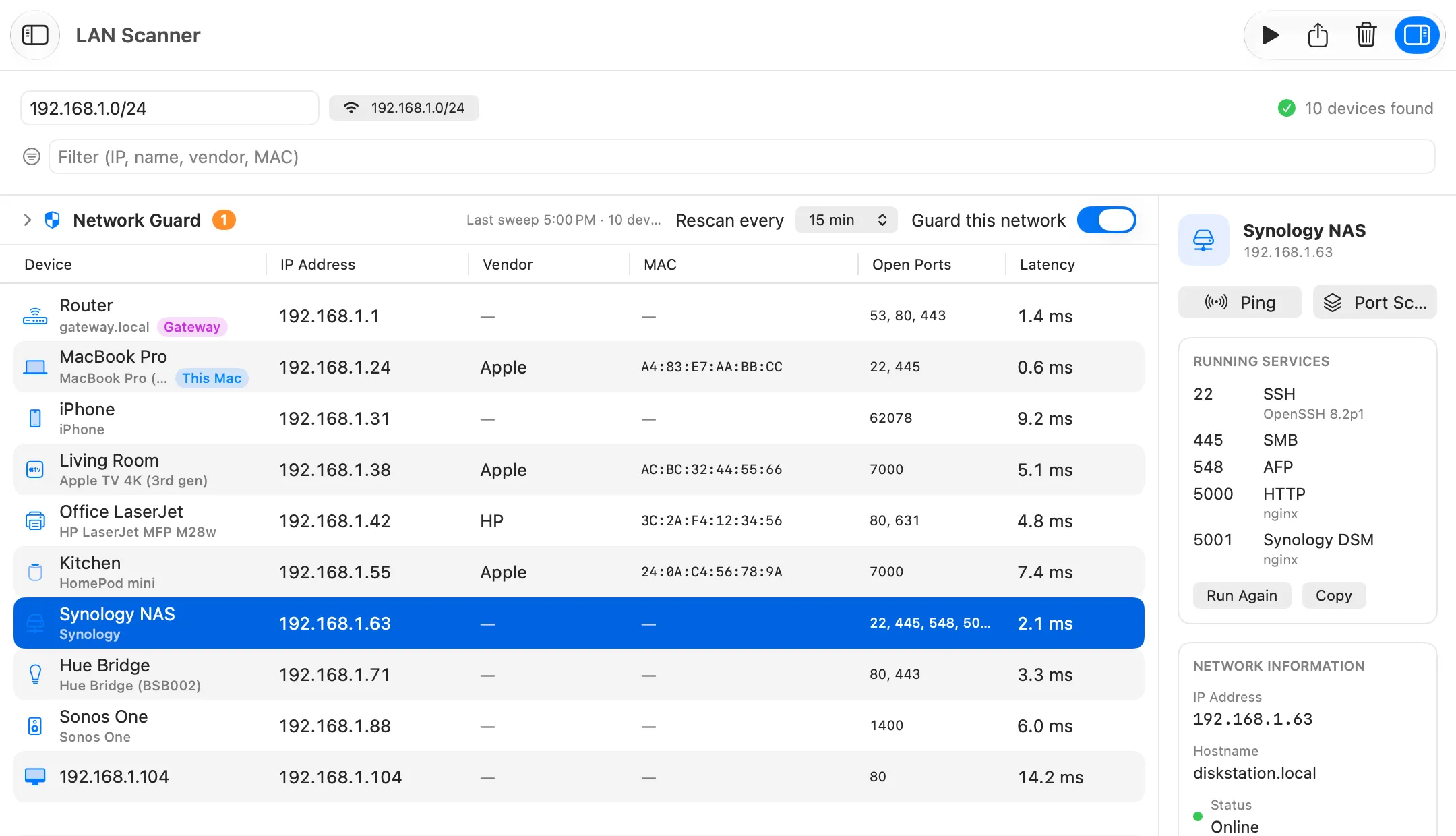
LAN Scanner is part of Netutilus Pro. It finds devices with a TCP sweep, Bonjour and reverse DNS, asks them for more over NetBIOS and SNMP, and names each one from what it announces about itself, sometimes down to the model: a Mac that publishes MacBookPro18,3 is shown as “MacBook Pro (14-inch, 2021)”.
- Columns: Device, IP Address, Vendor, MAC, Open Ports and Latency. Hostname, NetBIOS, Type and MAC Source can be added by right-clicking the header.
- Right-click a device: Copy IP Address, open its web page in the browser, Connect via SSH, Open in Finder (SMB), Open in Screen Sharing, Add to Uptime Monitor, or open it in Ping, Traceroute, MTR or Port Scan. The web, SSH, SMB and Screen Sharing items appear only when the matching port answered the scan.
- Check Services, in the side panel, checks one device’s common ports and asks each open one what software it runs.
- Network Guard, above the table, rescans on a schedule while Netutilus is running. Click Trust These Devices once, and it notifies you about every device that joins after that. It is part of Pro.
- Port Scan is free. It scans a host’s TCP ports, and optionally ten common UDP services, with service and version detection.
What it does not do: scan IPv6 or ranges wider than /22, connect over RDP or Radmin, or turn computers on and off. For “who is on my Wi-Fi” questions, see Who is on my network.
Recent versions of macOS hide other devices’ MAC addresses from apps, so Netutilus shows only the ones devices publish themselves. We have not tested the MAC column of the other Mac scanners on macOS 27. Terminal still shows them: on macOS 27.0.1, arp -a above printed a MAC address for every entry.
Where Advanced IP Scanner is still better
If you have a Windows PC on the network, Advanced IP Scanner is still the better tool for these jobs:
- It is free. Netutilus keeps LAN Scanner in Pro, LanScan’s free trial may obfuscate some results, and Fing’s free plan allows up to three scans a day.
- Remote control. It connects to a found PC over RDP or Radmin. On a Mac, RDP needs a separate app, such as Microsoft’s free Windows App.
- Remote power control. It can switch computers on and off. Netutilus cannot.
- Shared folders. It opens a PC’s network shares. On a Mac, use Finder › Go › Connect to Server, or Netutilus’s Open in Finder (SMB) for a device with port 445 open.
- No installation required. Famatech says it runs as a portable edition.
Which one to use
- You want a free app that works like Advanced IP Scanner: Angry IP Scanner.
- You are comfortable in Terminal:
arp -afor a quick look,nmap -snfor a full sweep. - You want devices named by model, with their ports and an alert when a new one joins: Netutilus LAN Scanner with Network Guard.
- You want the same scanner on your iPhone and your Mac: Fing.
- You need RDP, Radmin or remote shutdown: keep Advanced IP Scanner on a Windows PC.
Note: Netutilus is made by Poteam, who publish this site.