Commands tested on macOS 27.0.1 on 2026-10-20.
What happened to Network Utility
Network Utility was a small Apple app in /System/Library/CoreServices/Applications (Apple, macOS Catalina guide). It had eight tabs: Info, Netstat, Ping, Lookup, Traceroute, Whois, Finger and Port Scan. Apple’s Catalina help names Info, Netstat and Port Scan, and TidBITS lists netstat, ping, lookup, whois, traceroute and finger.
Apple deprecated Network Utility in macOS Big Sur (2020); Eclectic Light dates its full removal to macOS Ventura. Sources: MacRumors, 23 June 2020 and Eclectic Light, 17 July 2023.
| macOS | What happened | Source |
|---|---|---|
| 10.15 Catalina | The newest macOS that Apple’s Network Utility help pages cover | Apple |
| 11 Big Sur, first beta (June 2020) | Deprecated, “with the app no longer functioning in the first developer beta” | MacRumors |
| 11 Big Sur | “deprecated it in Big Sur by making it non-functional” | Eclectic Light |
| 13 Ventura | “it wasn’t completely removed until Ventura” | Eclectic Light |
| 27 | Not on the system (tested below) | This page |
When Apple dropped it, MacRumors reported that its functions “can still be replicated with Terminal commands”, and that for Wi-Fi problems Apple pointed to the Wireless Diagnostics app.
Network Utility on macOS 26 Tahoe and macOS 27 Golden Gate
It is not there. Ventura is macOS 13, and Sonoma (14), Sequoia (15), Tahoe (26) and Golden Gate (27) all came after it (Apple’s version list).
On a Mac with macOS 27.0.1, the folder where Network Utility used to live has Wireless Diagnostics but no Network Utility, and macOS cannot find an app with its bundle ID:
$ ls /System/Library/CoreServices/Applications/
About This Mac.app        Expansion Slot Utility.app  Ticket Viewer.app
Archive Utility.app       Feedback Assistant.app      Wireless Diagnostics.app
DVD Player.app            Folder Actions Setup.app    iOS App Installer.app
Desk View.app             Keychain Access.app
Directory Utility.app

$ open -b com.apple.NetworkUtility
LSCopyApplicationURLsForBundleIdentifier() failed while trying to determine the application with bundle identifier com.apple.NetworkUtility.
Wireless Diagnostics (version 11.0 on this Mac) is still in that folder. Eclectic Light notes that you can also reach it by holding Option while you open the Wi-Fi item in the menu bar (Eclectic Light, 9 December 2023). It is for Wi-Fi problems, not a replacement for the tabs above.
Each tab: the Terminal command and the app equivalent
Eclectic Light describes Network Utility as “a friendly front-end” to command tools. Each tab has a command that still ships with macOS 27. Open Terminal (Applications › Utilities) and use the command in the second column. The third column is the matching tool in Netutilus, and whether it is free or part of Netutilus Pro.
| Network Utility tab | Terminal on macOS 27 | Netutilus |
|---|---|---|
| Info: details of one network interface | ifconfig en0, route -n get default, scutil --dns |
Network Monitor, free: interfaces, addresses, gateway, VPN tunnels, and whether DNS is configured |
| Netstat: routing tables and protocol statistics | netstat -rn, netstat -s, netstat -an -p tcp, lsof -i -P -n |
None |
| Ping | ping -c 5 example.com |
Ping, free: ICMP or TCP, live chart |
| Lookup | dig example.com MX, nslookup example.com |
DNS Lookup, free |
| Traceroute | traceroute example.com |
Traceroute, free; MTR is Pro |
| Whois | whois example.com |
Whois, free: domains, IP addresses, AS numbers |
| Finger | finger |
None |
| Port Scan | nc -zv -G 1 192.168.1.1 79-81 |
Port Scan, free: TCP, optional UDP, service detection |
Netutilus has no Netstat and no Finger. If you need those two tabs, use Terminal or Neo Network Utility (below).
What the commands print
Ping, Lookup, Traceroute, Whois and Port Scan each have a tool page, linked in the table, that shows the Terminal command. Here is what the other three print.
Info. Your Mac’s address, the router, and the DNS servers macOS uses. en0 is Wi-Fi on this Mac; networksetup -listallhardwareports shows which device is which on yours.
$ ifconfig en0 | grep -E "inet |ether|status"
	ether aa:bb:cc:11:22:33
	inet 192.168.1.41 netmask 0xffffff00 broadcast 192.168.1.255
	status: active
$ route -n get default | grep -E "gateway|interface"
    gateway: 192.168.1.1
  interface: en0
$ scutil --dns | sed -n 3,5p
resolver #1
  search domain[0] : lan
  nameserver[0] : 192.168.1.1
Netstat. The routing table, and the connections open right now:
$ netstat -rn -f inet | head -6
Routing tables

Internet:
Destination        Gateway            Flags               Netif Expire
default            192.168.1.1        UGScg                 en0
127                127.0.0.1          UCS                   lo0
$ netstat -an -p tcp | head -3
Active Internet connections (including servers)
Proto Recv-Q Send-Q  Local Address          Foreign Address        (state)
tcp4       0      0  192.168.1.41.52154     198.51.100.20.443      ESTABLISHED
lsof -iTCP -sTCP:LISTEN -P -n lists only the ports something on your Mac is listening on, with the process name next to each.
Finger. It still ships with macOS. With no arguments it lists who is logged in to this Mac:
$ finger
Login            Name             TTY      Idle  Login  Time   Office  Phone
user             Mac User         console    9d  Oct 11 03:05
For a full port scanner in Terminal, install nmap with Homebrew (brew install nmap; formula).
Apps that replace it
If you would rather click than type, three current apps cover most of the old tabs. Netutilus is made by Poteam, who also publish this site. We did not run Neo Network Utility or NetUtil for this page: their columns are what each maker states.
Facts checked on 2026-10-20, on each maker’s own site or App Store page: Netutilus, Neo Network Utility (1.0 notes, 2.0 notes), NetUtil.
| Netutilus | Neo Network Utility | NetUtil | Terminal | |
|---|---|---|---|---|
| Maker | Poteam | DEVONtechnologies | Serious Business Software LLC | Apple |
| Latest version | 1.20.2 (16 October 2026) | 2.0 | 1.2.0 (from its download link) | Part of macOS |
| Requires | macOS 14.6 or later | macOS Ventura (13) or later | macOS 14.6 Sonoma or later | Any macOS |
| Licence | Free; Netutilus Pro is a one-time in-app purchase | Free | Free, no ads or in-app purchases | Free, built in |
| Where to get it | Mac App Store | Direct download from devontechnologies.com | Direct download from netutil.app | Applications › Utilities |
| Old tabs covered | Info (as Network Monitor), Ping, Lookup, Traceroute, Whois, Port Scan | Info, Netstat, Ping, Lookup, Traceroute, Whois, Finger, Port Scan | Ping, Traceroute, DNS Lookup, Netstat, Whois, Port Scan | All eight, as commands |
| Speed test | Speed Test (free; scheduled tests and history in Pro) | Network Speed | Not listed | networkQuality |
Eclectic Light recommends a fourth app, Bryan Christianson’s WhatRoute, which “includes the features of Network Utility, with greatly enhanced route tracing and visualisation” (Eclectic Light). Its download page lists version 2.8.2 as a direct download, asks for donations, and says versions 2.8.x need macOS Sonoma (14.6).
Where Neo or Terminal is the better pick
- You want every tab back, Netstat and Finger included. Neo Network Utility’s release notes list all eight. Netutilus has neither Netstat nor Finger, and NetUtil does not list Finger.
- Your Mac runs macOS Ventura (13). Neo runs there. Netutilus and NetUtil need macOS 14.6 or later.
- You want nothing to install. Terminal is already on every Mac, and every command above is built in.
- You want a record or a script. Terminal output pastes into a support ticket as text, and the same command runs in a loop or a cron job.
- You need open connections with process names. In Terminal,
netstat -anvadds aprocess:pidcolumn, andlsof -istarts each line with the process name.
Netutilus fits when you want the old tabs plus the tools in the last section in one window. Its Ping has a TCP mode for hosts that block ICMP, and its Port Scan can probe common UDP services.
Why not copy the old app from a Catalina installer
Network Utility was part of macOS, not a separate app, so there is no download from Apple. A copy has to come from an older macOS. Reasons to skip it:
- Only a pre–Big Sur copy works at all. Apple made the app non-functional in Big Sur (Eclectic Light), so the copy has to come from Catalina or earlier.
- You have to re-sign it yourself. Writing in 2024 about Macs too old for Neo, TidBITS reports that you can use an old copy “if you ad hoc code-sign it” (TidBITS). That replaces Apple’s code signature with your own ad hoc one. We found no report of it working on macOS 26 or 27, and we did not test it.
- Terminal already does the same jobs. Every command in the table above ships with macOS 27.
What Network Utility never had
Network Utility answered “is it up, and what is the path?”. None of its eight tabs tested speed, analysed Wi-Fi or listed the devices on your network. macOS added one of those as a command: Eclectic Light notes that Monterey brought networkQuality (Eclectic Light). Run networkQuality in Terminal: it measures upload and download capacity and how responsive the connection stays under load.
These Netutilus tools have no tab in the old app:
| Tool | What it does | Free or Pro |
|---|---|---|
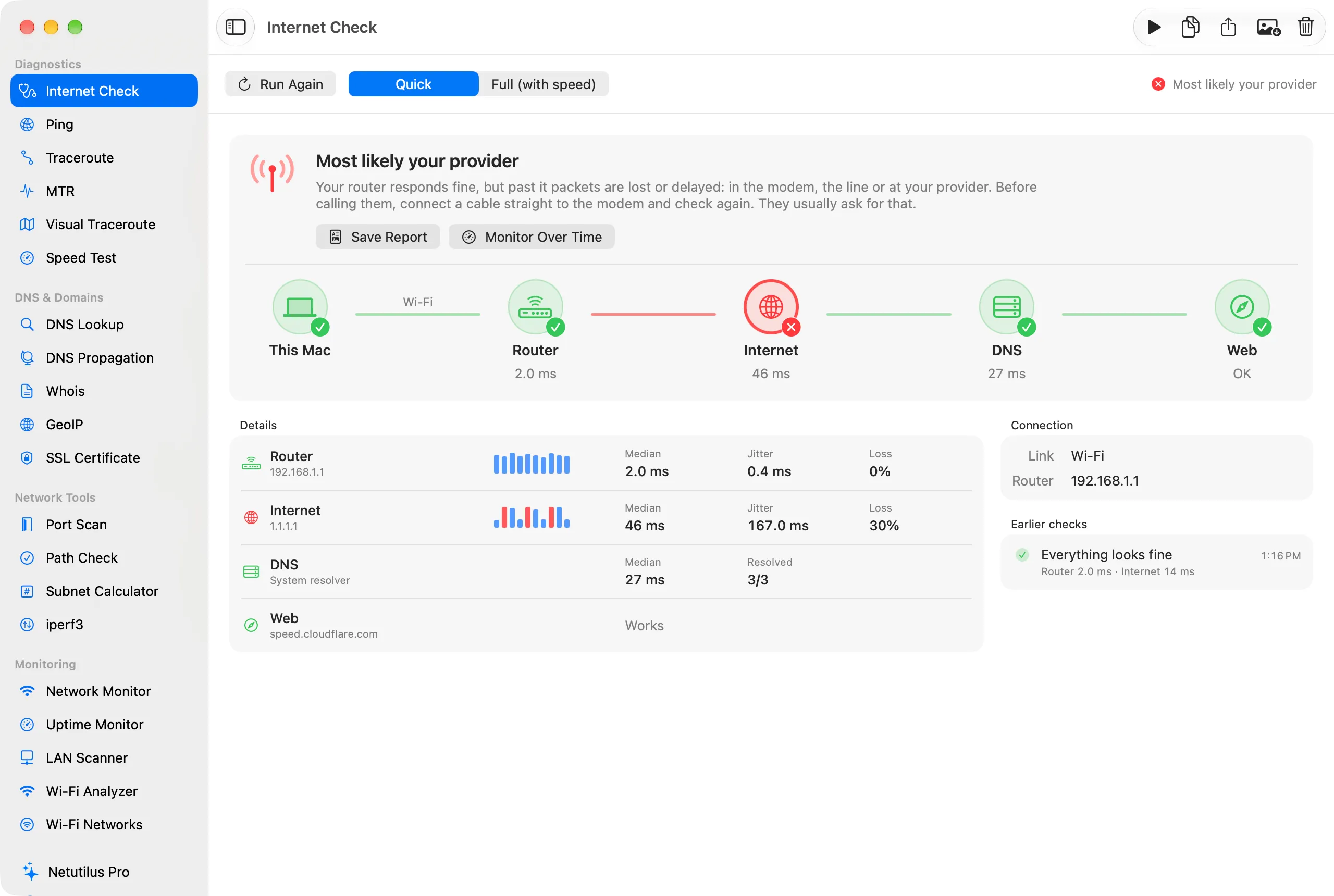
| Internet Check | Tells whether a problem is on your side or at your provider | Free |
| Speed Test | Download, upload, and a bufferbloat grade | Free; scheduled tests and history in Pro |
| MTR | A traceroute that keeps running, with loss per hop; no Homebrew or sudo | Pro |
| Visual Traceroute | The route drawn on a map | Pro |
| DNS Propagation | Asks several public resolvers at once | Free |
| SSL Certificate | The certificates a server presents, and when they expire | Free |
| Path Check | Whether a host answers on the ports you need | Free |
| LAN Scanner | The devices on your network, with alerts for new ones | Pro |
| Wi-Fi Analyzer and Wi-Fi Networks | Live signal, crowded channels, a better channel | Pro |
| Uptime Monitor | Checks servers and sites on a schedule, with history | Pro |